
Understanding the Compiler Infrastructure that Powers Modern Programming Languages

1. Introduction
Before the rise of modern programming languages, developers had to write software by directly manipulating binary machine code or using assembly language — a low-level, hardware-specific language that offered minimal abstraction. This process was error-prone, tedious, and tightly coupled to specific processor architectures.
Over time, high-level languages like C, C++, and Rust emerged to simplify development and improve productivity. But translating these languages into efficient, optimized machine code still required a sophisticated toolchain.
This is where LLVM comes in — a powerful, modular compiler infrastructure designed to bridge the gap between high-level abstractions and low-level execution, enabling cross-platform code generation, optimization, and flexibility.
In this article, we’ll explore what LLVM is, how it works, and why it plays such a critical role in modern software development. We’ll also walk through the process of converting high-level code to LLVM IR, then to assembly, and finally to machine code.
2. What Is LLVM?
LLVM stands for Low-Level Virtual Machine, but despite the name, it’s not a virtual machine like the JVM or the .NET CLR.
Instead, LLVM is a modular, reusable compiler infrastructure that helps you:
- Compile code from many high-level languages (like C, C++, Rust, Swift)
- Optimize and analyze that code
- Generate machine code for various CPU architectures (x86, ARM, etc.)
Originally developed as a research project at the University of Illinois, LLVM has now become the foundation for modern compilers like:
- Clang (C/C++)
- Swift compiler
- Rust compiler (rustc uses LLVM backend)
- Julia compiler
- Kotlin Native
3. Why Use LLVM Instead of Assembly?
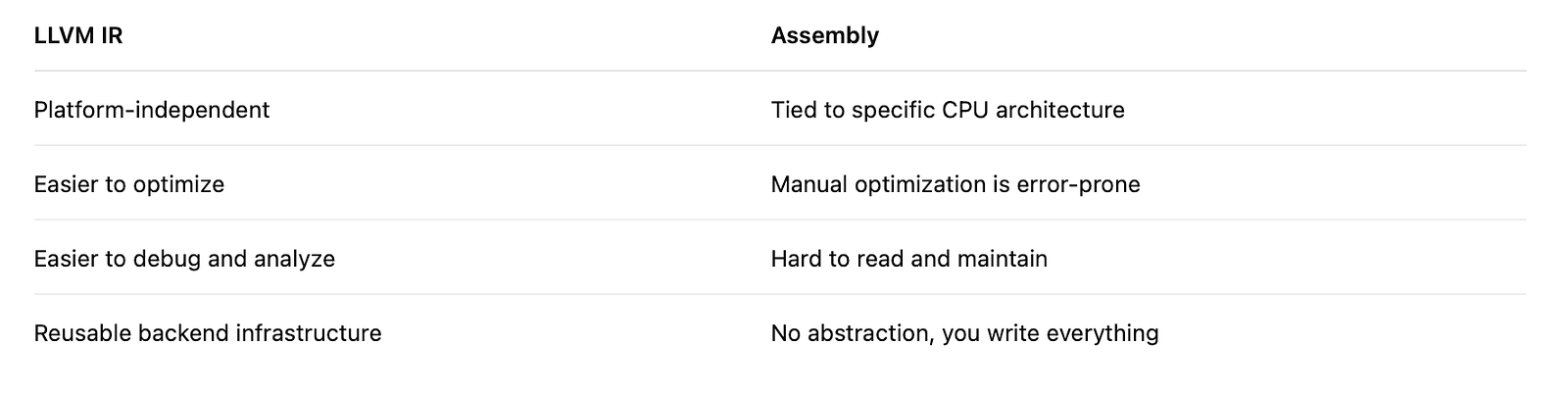
Instead of writing code directly in assembly (which is error-prone and hardware-specific), LLVM lets you write your own language, compiler, or optimizer, and focus on logic rather than hardware.
LLVM takes care of:
- Code optimization
- Instruction selection
- Register allocation
- Platform-specific binary generation
Pros of LLVM
4. How LLVM Works: From Source Code to Machine Code
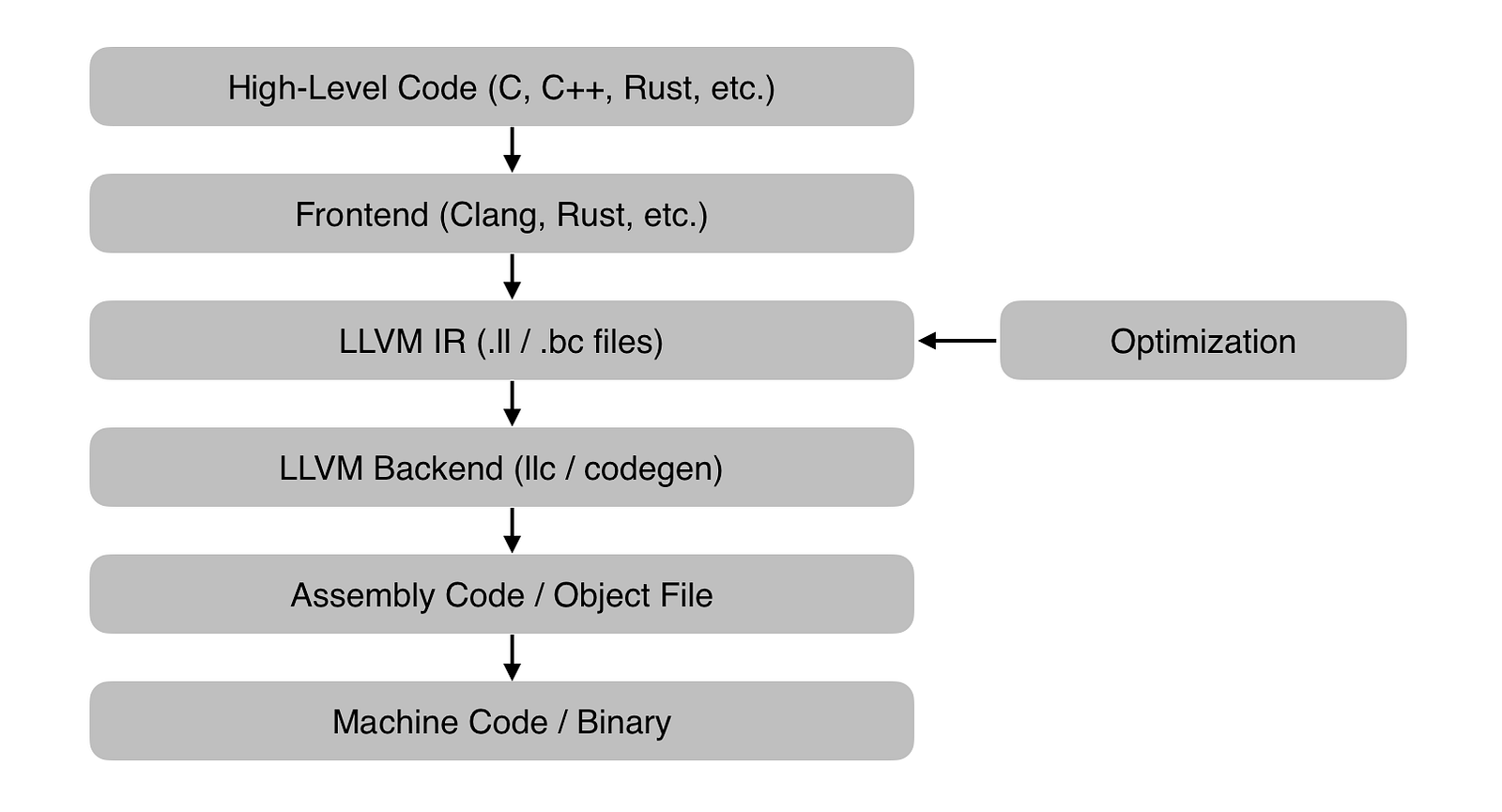
Here’s a high-level overview:
5. LLVM Compilation Pipeline — Step-by-Step
Let breakdown the LLVM Compilation Pipeline Step by Step
1. High-Level Code (C, C++, Rust, etc.)
This is the source code written by developers in modern programming languages.
// add.c #include// add.c
#include <stdio.h>
int add(int a, int b) {
return a + b;
}
int main() {
int result = add(3, 4);
printf("The result is :%d\n", result);
return 0;
}
This code is readable by humans, but not executable by a computer yet.
2. Frontend (Clang, rustc, etc.)
The frontend is responsible for:
- Parsing the high-level source code.
- Performing syntax and semantic analysis.
- Converting the code into LLVM Intermediate Representation (IR).
Example :
- Clang handles C/C++ → LLVM IR
- rustc (Rust compiler) can target LLVM IR
3. LLVM IR (.ll / .bc files)
LLVM IR (Intermediate Representation) is a low-level, platform-independent code.
It comes in two forms:
- .ll → human-readable text format
- .bc → binary bytecode format
Why is IR important ?
- It’s easier to analyze, transform, and optimize than raw assembly.
- Enables cross-language and cross-platform toolchains.
4. Optimization
LLVM can apply hundreds of optimization passes to IR, such as:
- Dead code elimination
- Constant folding
- Loop unrolling
- Function inlining.
Optimizations happen at the IR level, independent of the target CPU.
5. LLVM Backend (llc / codegen)
The LLVM backend takes the optimized IR and generates:
- Assembly code (.s)
- Or directly generates object code (.o)
This is done using tools like:
- llc → Converts LLVM IR to target-specific assembly
- codegen → LLVM’s internal code generation logic
6. Assembly Code / Object File
Now we’re at the hardware level:
- Assembly code is readable low-level code for a specific CPU architecture (x86, ARM, etc.).
- Object files are binary representations of this code, often not yet linked.
Example file types :
- .s → assembly
- .o or .obj → compiled object file
7. Machine Code / Binary
Final step: the object file is linked with others (libraries, runtime, etc.) to produce:
- Executables (.exe, ELF, etc.)
- Static or dynamic libraries
This is the raw binary code that runs on your physical machine.
6. Practical Example: C Code to Assembly via LLVM
Installation
Before you begin, first install LLVM on your machine. In my case, I am using Ubuntu. You can find more details for other platform here.
1. Install LLVM via apt On Linux
sudo apt update
sudo apt install llvm clang
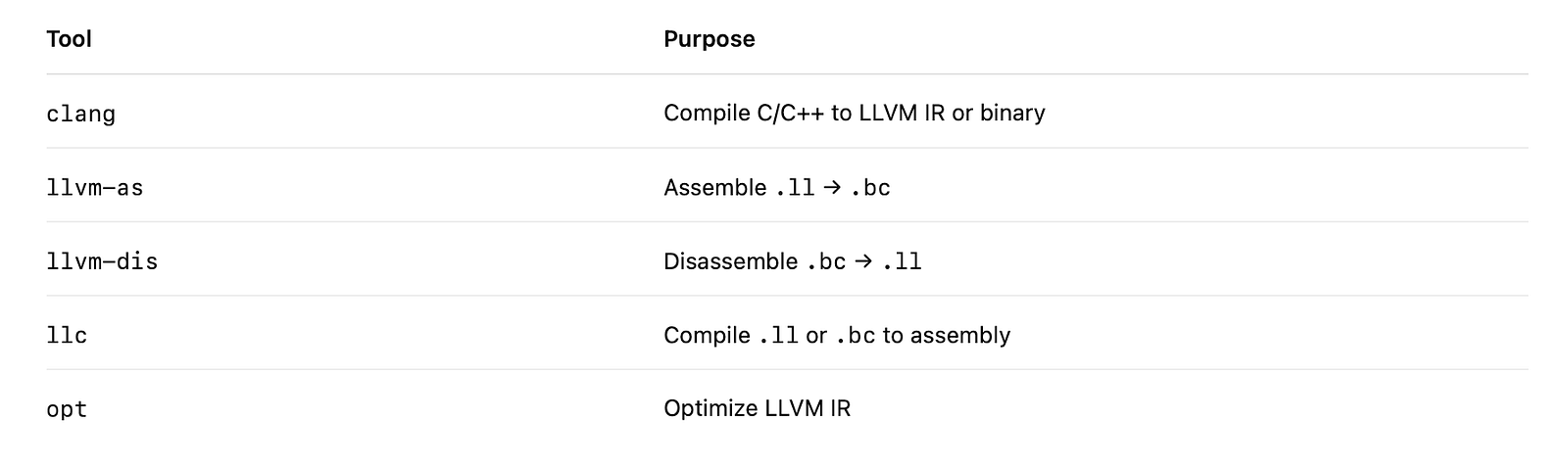
This will install the LLVM tools (including clang, llc, opt, llvm-as, llvm-dis, etc.).
2. Verify the Installation
You can now check that LLVM tools are available:
clang --version # LLVM frontend compiler
llc --version # LLVM backend compiler
opt --version # Optimizer
llvm-as --version # LLVM IR → bytecode
llvm-dis --version # Bytecode → LLVM IR
7. Now You Can Try the LLVM Pipeline
Let’s walk through a real example using Clang (LLVM’s C/C++ frontend).
Step 1 — Write a Simple C Program
// add.c
#include <stdio.h>

int add(int a, int b) {
    return a + b;
}

int main() {
    int result = add(3, 4);
    printf("The result is :%d\n", result);
    return 0;
}
Step 2 — Compile to LLVM IR (Text)
clang -S -emit-llvm add.c -o add.ll
This creates a file add.ll containing LLVM IR like:
; ModuleID = 'add.c'
source_filename = "add.c"
target datalayout = "e-m:e-p270:32:32-p271:32:32-p272:64:64-i8:8:32-i16:16:32-i64:64-i128:128-n32:64-S128-Fn32"
target triple = "aarch64-unknown-linux-gnu"

@.str = private unnamed_addr constant [19 x i8] c"The result is :%d\0A\00", align 1

; Function Attrs: noinline nounwind optnone uwtable
define dso_local i32 @add(i32 noundef %0, i32 noundef %1) #0 {
  %3 = alloca i32, align 4
  %4 = alloca i32, align 4
  store i32 %0, ptr %3, align 4
  store i32 %1, ptr %4, align 4
  %5 = load i32, ptr %3, align 4
  %6 = load i32, ptr %4, align 4
  %7 = add nsw i32 %5, %6
  ret i32 %7
}

; Function Attrs: noinline nounwind optnone uwtable
define dso_local i32 @main() #0 {
  %1 = alloca i32, align 4
  %2 = alloca i32, align 4
  store i32 0, ptr %1, align 4
  %3 = call i32 @add(i32 noundef 3, i32 noundef 4)
  store i32 %3, ptr %2, align 4
  %4 = load i32, ptr %2, align 4
  %5 = call i32 (ptr, ...) @printf(ptr noundef @.str, i32 noundef %4)
  ret i32 0
}

declare i32 @printf(ptr noundef, ...) #1

attributes #0 = { noinline nounwind optnone uwtable "frame-pointer"="non-leaf" "no-trapping-math"="true" "stack-protector-buffer-size"="8" "target-cpu"="generic" "target-features"="+fp-armv8,+neon,+outline-atomics,+v8a,-fmv" }
attributes #1 = { "frame-pointer"="non-leaf" "no-trapping-math"="true" "stack-protector-buffer-size"="8" "target-cpu"="generic" "target-features"="+fp-armv8,+neon,+outline-atomics,+v8a,-fmv" }

!llvm.module.flags = !{!0, !1, !2, !3, !4}
!llvm.ident = !{!5}

!0 = !{i32 1, !"wchar_size", i32 4}
!1 = !{i32 8, !"PIC Level", i32 2}
!2 = !{i32 7, !"PIE Level", i32 2}
!3 = !{i32 7, !"uwtable", i32 2}
!4 = !{i32 7, !"frame-pointer", i32 1}
!5 = !{!"Ubuntu clang version 20.1.2 (0ubuntu1)"}
As you can see this is quite a lot of code just to do a + b, this is what happens behind the scene when you click the compile button on you IDE
You can create a optimized version of this file with the following command, and the output file will a binary version of the original .ll file
opt -O2 add.ll -o add_opt.ll
Step 3 — Compile to LLVM Bitcode (Binary)
clang -emit-llvm -c add.c -o add.bc
This produces a compact .bc file — a binary version of the .ll file.
Step 4 — Convert LLVM IR to Assembly
Use llc to compile LLVM IR to native assembly:
llc add.ll -o add.s
The add.s file will contain human-readable x86 or ARM assembly (depending on your machine):
add:
  movl    %edi, %eax
  addl    %esi, %eax
  ret
Step 5 — Convert to Machine Code (Executable)
You can now use clang or ld to link the assembly or bitcode into an actual executable:
clang add.s -o add
# or
clang add.bc -o add
Now you have a native binary executable that runs on your platform.
./add # The result is :7
8. LLVM Toolchain Summary
9. Why LLVM?
LLVM provides:
- Modularity: Frontends, optimizers, and backends are separate.
- Reusability: Multiple languages (Swift, Rust, Julia) reuse the LLVM backend.
- Portability: Compile once to IR, then target multiple architectures.
- Optimization: Advanced and aggressive performance tuning.
10. What Languages Use LLVM?
- C / C++ — via Clang
- Swift
- Rust
- Julia
- Kotlin Native
- Zig
- HLSL / Shader compilers
You can also create your own custom language using LLVM’s APIs (C++, Rust, or bindings in Python, Go, etc.).
11. References